Stock Take
A Stock Take is a physical inventory count — and on approval, it can automatically generate several Stock Movement documents to correct what it finds.
1. What is a Stock Take?
A Stock Take records a physical count of stock in a warehouse and compares it against what the system expects.
- Go to Inventory → Stock Take and click Create.
- Fill in the form:
- Warehouse — locked.
- Count type — Full counts all items in the warehouse; Scoped limits the count to specific storage units or product categories.
- Freeze inventory — if ticked, blocks all inventory operations for the warehouse during the count process.
- Blind count — if ticked, users performing the count won't see the expected quantities.
- Scheduled date — required; can't be set in the past.
- Warehouse units / Product categories — optional; only used to limit a Scoped count.
- Document manager — optional.
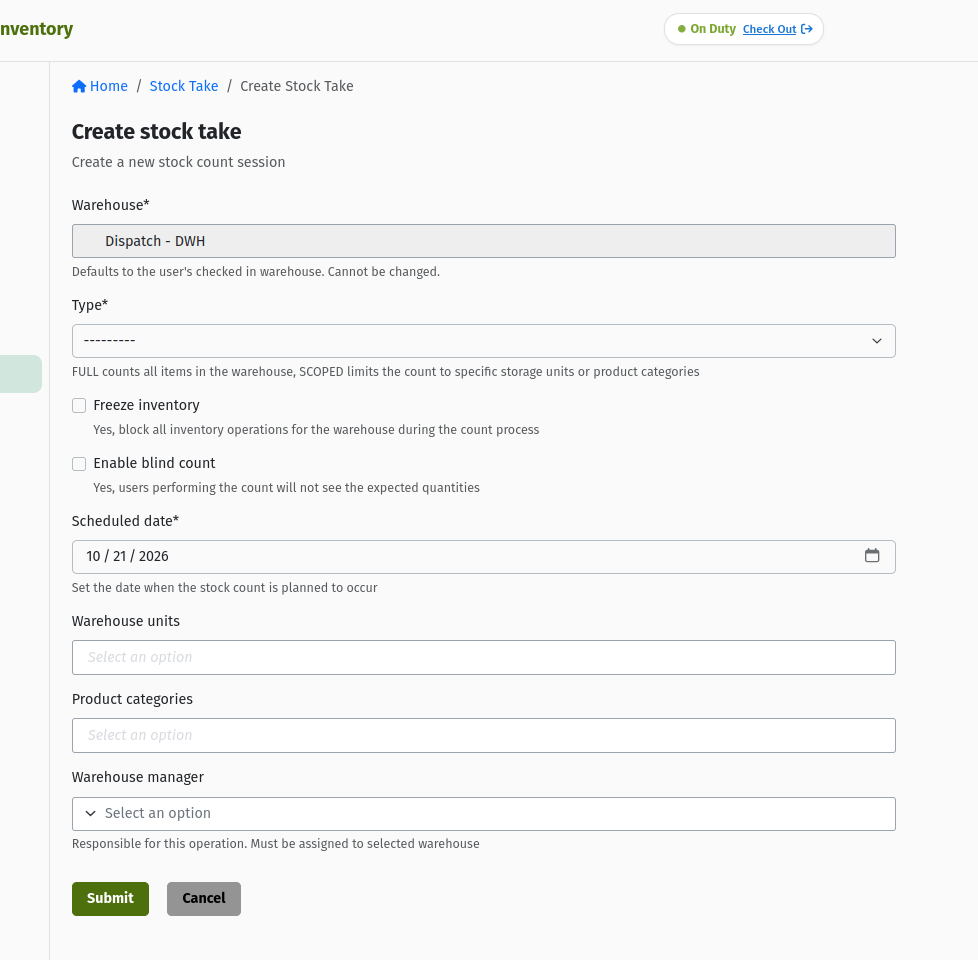 The Stock Take create form.
A Full count can't have Warehouse units or Product categories set — leave those pickers empty if you choose Full, or the form will reject it.
2. Creating and running a count
A Stock Take moves through its own lifecycle, separate from the Stock Movement documents:
DRAFT       →  APPROVED, VOID
APPROVED    →  IN_PROGRESS, VOID
IN_PROGRESS →  READY, VOID
READY       →  COMPLETE, VOID
COMPLETE    →  ARCHIVED
VOID        →  ARCHIVED
ARCHIVED    →  (terminal)
| You are here | You click | It becomes |
|---|---|---|
| DRAFT | Approve | APPROVED |
| APPROVED | Start | IN_PROGRESS |
| IN_PROGRESS | Finish | READY |
| READY | Complete | COMPLETE |
| COMPLETE | Archive | ARCHIVED |
| Draft / Approved / In Progress / Ready | Cancel | VOID |
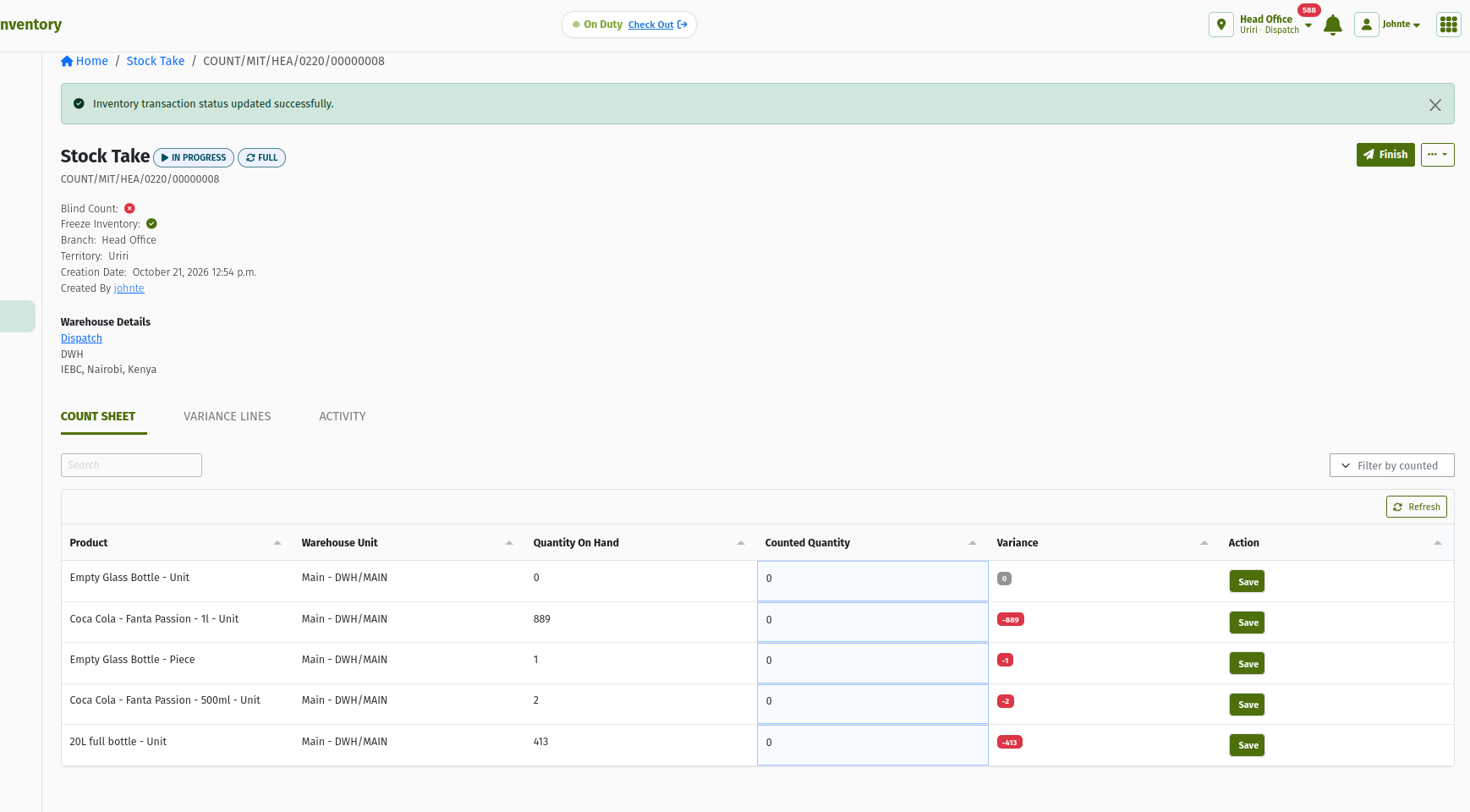 A Stock Take detail page while In Progress, with count lines visible.
| Status | What's editable |
|---|---|
| DRAFT | Fully editable. No count lines exist yet. |
| APPROVED | Locked. No edits. |
| IN_PROGRESS | Count lines have been generated and their counted quantities are editable. |
| READY / COMPLETE / VOID | Not editable. |
If you ticked Freeze inventory when creating the count, the warehouse is locked while the count is active — other inventory documents for that warehouse can't be approved until the count is finished.
3. Recording discrepancies
Where a counted line doesn't match the expected quantity, you can record one or more breakdowns explaining why.
- On a count line with a variance, add a breakdown with a Reason: Damage, Theft, Misplacement, Count Error, System Error, Expiry, Found, Loss, Client Collection, or Other.
- For Damage, Expiry, or Misplacement, also choose a Disposition: Write Off, Rework, Return, Quarantine, or Transfer Out — this determines what happens to the stock next (see Section 4 below).
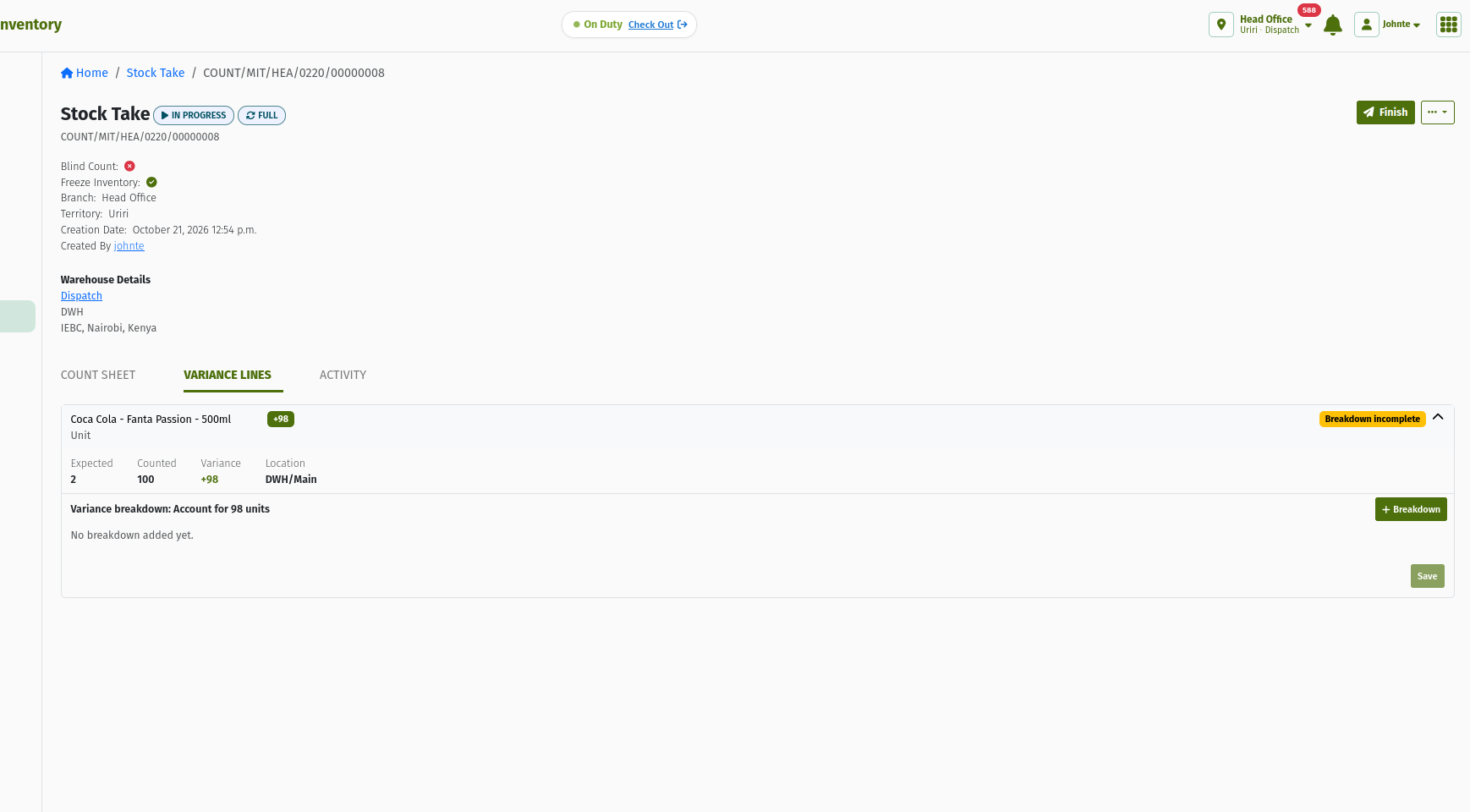 Recording a discrepancy breakdown against a counted line, with Reason and Disposition.
4. What a Stock Take generates
Once a Stock Take is completed, the system uses your recorded discrepancies to automatically generate the Stock Movement documents needed to correct stock:
| Trigger | What's generated |
|---|---|
| Any leftover variance not otherwise dispositioned | An Adjustment, created and posted automatically — no separate manual approval step. |
| Breakdown dispositioned Write Off | A Write Off document, created in Draft for you to review and submit. |
| Breakdown dispositioned Quarantine, Rework, or Transfer Out | A Transfer or Internal Transfer, created in Ready. |
| Breakdown dispositioned Return | A Return Out, created in Draft — grouped one document per supplier. |
No screenshot is currently available for the completed Stock Take's generated-documents tab (stocktake-04-generated-documents-tab.png in the source training material has not been captured yet).
Any generated Write Off, Transfer, Internal Transfer, or Return Out still needs to go through its own approval steps — covered in the Stock Movements guide — before it takes effect. Only the residual Adjustment is posted automatically.
5. Quick reference
Status meanings
| Status | What it means |
|---|---|
| DRAFT | Being set up. Fully editable. |
| APPROVED | Signed off to begin. Locked. |
| IN_PROGRESS | Counting under way. Counted quantities editable. |
| READY | Counting finished, awaiting completion. |
| COMPLETE | Finished. Follow-up documents generated. |
| VOID | Called off before completion. |
| ARCHIVED | Closed out. Terminal. |
Glossary
- Full count — counts every item in the warehouse.
- Scoped count — limits the count to chosen warehouse units or product categories.
- Freeze inventory — blocks other inventory operations for the warehouse while the count is active.
- Blind count — hides expected quantities from whoever is performing the count.
- Disposition — what happens next to a discrepancy: written off, quarantined, sent for rework, transferred out, or returned to a supplier.
6. Frequently asked questions
Do I have to record a disposition for every discrepancy?
A disposition is required for Damage, Expiry, and Misplacement reasons. Any variance you don't otherwise account for is rolled into the automatic residual Adjustment when the count is approved.
Do the documents a Stock Take generates need approving separately?
The residual Adjustment is posted automatically. Any generated Write Off, Transfer, Internal Transfer, or Return Out still needs to go through its own approval in the Stock Movements guide before it takes effect.
What does Freeze inventory actually block?
It locks the warehouse for the duration of the count, so other inventory documents targeting that warehouse can't be approved until the count finishes.